.png?width=3750&height=938&name=Easyshul%20Logo%20(1).png)
Setting up online donations for your synagogue can boost contributions by 27% while saving time on manual tasks like tracking checks and issuing tax receipts. With platforms like Easyshul, you can create branded, secure donation pages that reflect Jewish traditions (e.g., Chai multiples of $18), enable recurring giving, and integrate seamlessly with your website and accounting tools. Here's a quick summary of the key steps:
- Register your synagogue on Easyshul with essential details (e.g., tax ID, bank account info).
- Choose a plan based on congregation size (e.g., $349/month for larger synagogues).
- Customize donation pages with your logo, colors, and tailored campaigns.
- Set up recurring donations to encourage consistent giving.
- Embed donation forms on your website for easy access.
- Configure payment processing securely with PCI compliance.
- Train staff to manage the system and assist members.
- Promote online giving through announcements, emails, and social media.
With 60% of people preferring to donate online, this approach ensures a smoother giving experience while increasing financial support for your synagogue.
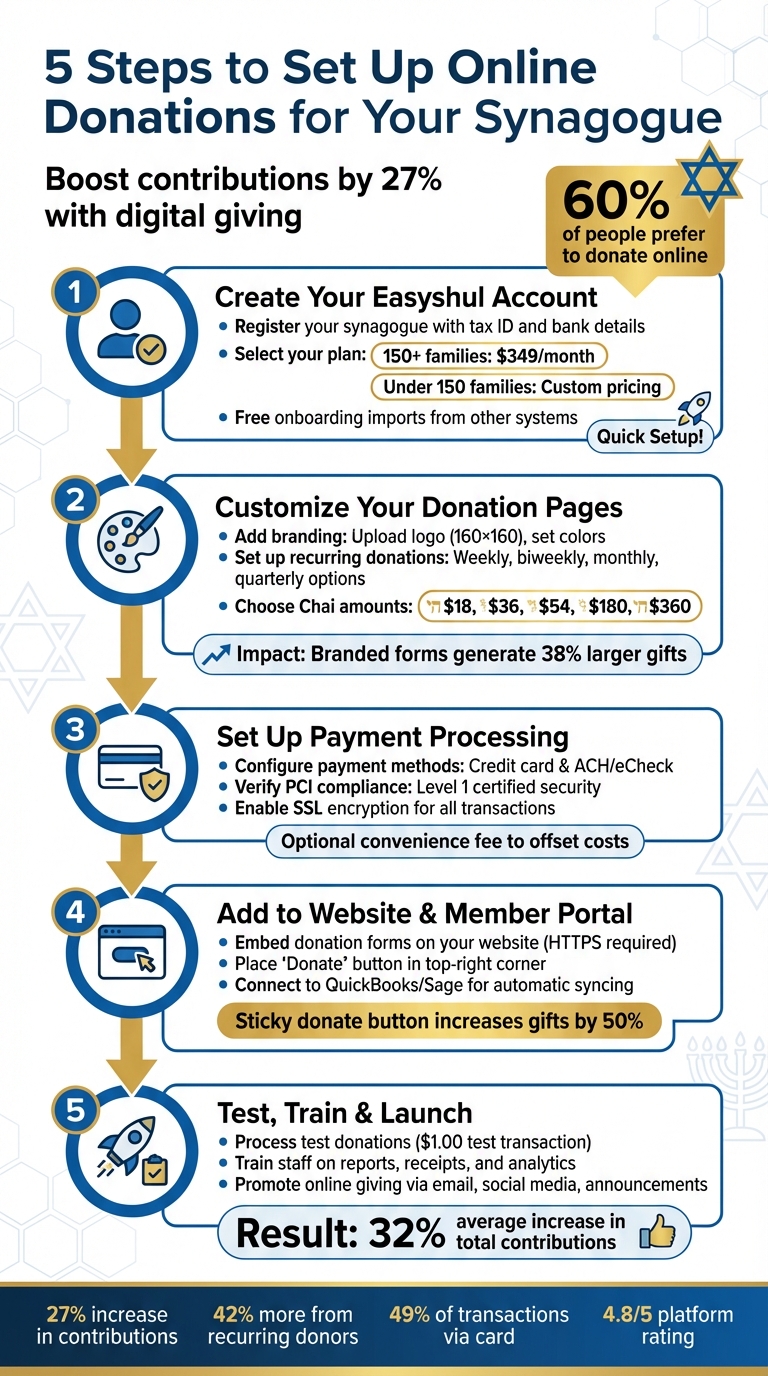
5 Steps to Set Up Online Donations for Your Synagogue
Step 1: Create Your Easyshul Account
Register Your Synagogue on Easyshul
Before diving in, gather some key details about your synagogue: its name, address, tax ID (EIN), and bank account information. Having these ready will make the process smoother.
One standout feature of Easyshul is the ability to choose your own payment processor. This gives you the flexibility to negotiate lower digital fees, which can lead to significant savings.
If you’re switching from a system like Rakefet, Chaverware, or MM2000, Easyshul simplifies the transition with free onboarding imports. Just export your membership and financial data in the required formats. If you’re using a different system, Easyshul provides data templates to help you transfer your historical records without a hitch.
"The migration was seamless for us. Easyshul's onboarding process was wonderful - we felt fully supported every step of the way. The system was simple to learn and truly user-friendly." - Renee Delafranconi, Executive Director, Temple Emanu El
Once your data is ready, the next step is selecting a plan that fits your congregation.
Select Your Easyshul Plan
After registering, you’ll need to choose a plan based on the size of your congregation.
- For synagogues with more than 150 families, the Everything You Need plan costs $349 per month, plus digital payment fees. This plan includes a full range of tools, such as donation features, QuickBooks or Sage integration, and 24/6 support via email, chat, and phone.
- Smaller congregations with fewer than 150 families can opt for the Small & Mighty Synagogue Program, which offers custom pricing tailored to your needs. Contact Easyshul directly for details.
Both options provide the same robust features, including campaign pages, recurring donations, tribute letters, automated follow-ups, and instant tax receipts. The size of your synagogue doesn’t mean sacrificing functionality.
"What made me feel confident about choosing Easyshul was knowing it had everything I needed. They truly listen to customer feedback and adapt the platform to users' needs - which is vital." - Amber Giddings, Executive Director, Temple Beth Sholom
Once you’ve signed up, Easyshul assigns you a dedicated account manager and offers live training sessions for your team. These sessions can even be customized to fit specific staff roles, ensuring everyone feels confident using the platform.
sbb-itb-549ca3a
Step 2: Customize Your Donation Pages
Add Your Branding and Campaign Details
Your donation page should reflect your synagogue's identity seamlessly. Start by uploading your logo and setting your synagogue's colors in the Settings → Branding section. Easyshul will automatically apply these elements across all donation and thank-you pages, delivering a consistent experience for your community.
For a polished look, use a square logo sized at 160×160. Ensure that button colors contrast well with white text for readability. You can match your website's color scheme exactly by using Hex, RGB, or HSL codes.
Did you know that branded donation forms typically generate 38% larger gifts compared to generic ones? Beyond just your logo, try adding header images that highlight your community or programs to create an emotional connection with donors. You can also tailor individual campaign pages - like a building fund or a Passover Ma'ot Chitim appeal - with unique themes to emphasize each cause.
When writing campaign descriptions, keep them concise and to the point. Use clear labels such as "Tzedakah", "Ma'ot Chitim", or "Synagogue Upkeep", and include a short mission summary (just a sentence or two) to explain why each gift matters. For example, saying, "Your $180 gift sponsors one student for Hebrew school", helps donors visualize the impact of their contribution. Adding tribute fields like "in honor of" or "in memory of" can also make the process more personal and meaningful for your members.
Once your branding and campaigns are set, focus on encouraging regular, recurring support.
Set Up Recurring Donations
Strong branding and clear messaging help build trust, which is key to fostering long-term donor relationships. Easyshul lets you offer flexible recurring donation options - weekly, biweekly, monthly, or quarterly - so donors can choose what works best for them. You can also set a default interval (like monthly) to make it easier for donors to commit to consistent giving.
Recurring donors are incredibly valuable. On average, they contribute 42% more annually and are 440% more valuable over time compared to one-time donors. As one expert puts it:
"Your average recurring donor will likely give 42% more throughout the year than your one-time donors. The reason being that people feel comfortable giving in smaller amounts over the course of a year than a larger amount at one time!"
To make recurring gifts more approachable, suggest smaller amounts than you would for one-time donations. For example, offering $10–$25 for weekly or monthly gifts can encourage regular contributions without overwhelming donors. With approximately 60% of synagogue members now preferring digital giving, congregations that accept online donations see an average 32% increase in total contributions.
Choose Suggested Donation Amounts
Instead of leaving the donation amount open-ended, guide your donors by offering five or six suggested tiers. For synagogues, using multiples of $18 (Chai) is a meaningful and practical approach. Examples might include $18, $36, $54, $180, and $360 - amounts that resonate with Jewish tradition while simplifying the decision-making process.
Pair these suggested amounts with descriptions that show the impact of each gift. For example, "$54 provides three holiday meals" or "$180 sponsors one student for Hebrew school." This kind of transparency builds trust and satisfaction among donors. Research shows that 84% of people are more likely to give when they understand how their donation will be used.
Finally, keep your donation forms as short as possible by only collecting essential details like name, email, and phone number. Studies reveal that 65% of visitors will abandon a form if it asks for too much information, so streamlining the process is crucial to reducing donor fatigue.
Step 3: Set Up Payment Processing
Configure Payment Methods
Easyshul gives you the flexibility to choose between credit card payments and ACH/eCheck transactions. With its "no lock-in" approach, you can select your preferred payment processor and negotiate your own fees, ensuring more of your community's funds stay within the organization.
To get started, head to Settings → Payment Processing and link your U.S. bank account. You can verify your ACH details instantly using Plaid or opt for micro-deposit verification, which takes 24–48 hours. To speed up account linking, enable Plaid by navigating to Admin → Settings → Edit Settings → Credit Card Display.
You also have the option to set up a convenience fee - like a 3% charge - to offset processing costs. For donations, make this fee an optional checkbox so donors can decide whether to cover it. Members can securely save their credit card details in the Member Portal, making future payments quicker and easier.
Verify PCI-Compliant Security
Once your payment methods are set up, it's essential to confirm that your processing environment meets strict security standards.
When dealing with financial transactions, security is critical. Easyshul is a Level 1 Certified PCI Compliant Service Provider, adhering to the highest security requirements set by the PCI Security Council and processing banks. All sensitive data - whether personal, credit card, or bank information - is protected with SSL and advanced encryption. To enhance security, enable Captcha on public-facing pages and require manual approval for payments made by non-logged-in donors. Additionally, you can set up threshold limits in your gateway settings to flag donations above a certain amount for manual review.
It's worth noting that Easyshul never stores complete credit card data. Your payment processor securely retains this information, showing only the last four digits and the card's expiration date.
Step 4: Add Donations to Your Website and Member Portal
Embed Donation Forms on Your Website
Making it easy for donors to contribute starts with embedding donation forms directly on your website or providing a secure link to a dedicated page. Embedding keeps visitors on your site, creating a smoother experience, while direct links are often quicker and more secure - especially if your site doesn't have advanced security measures in place.
To protect donor information, ensure your website uses HTTPS. Place the "Donate" button in the top-right corner of your site - this is where users naturally look first. Use a contrasting color for the button to make it stand out.
Consider adding a sticky "Donate" button that stays visible as users scroll. This simple feature can increase donations by up to 50%. Another option is a pop-up modal that allows donors to complete their contribution without leaving the page, keeping the process smooth and uninterrupted.
For email campaigns or social media, a direct donation link (e.g., synagogue.easyshul.com/donation) works well. This method redirects donors to a secure page. To ensure donations are correctly credited to member accounts, remind donors to enter their name and email exactly as they appear in their Easyshul profile.
Once your donation form is ready, integrate it with your membership and financial tools to streamline the process.
Connect with Membership and Financial Tools
Easyshul simplifies donation management by automatically recording transactions and syncing them with your accounting software through the membership CRM. This eliminates the need for manual data entry, saving time and reducing errors.
Members can access donation tools through a passwordless login system. They just enter their email to receive a single-use PIN. Once logged in, they'll find the donation module, marked with a heart icon, in the left-hand navigation panel. From there, members can set up recurring donations, review their giving history, and manage saved payment methods - all without needing to remember a password.
"There is no password to remember! Each time you login, a new single-use pin/code will be sent to your email address. Use that code to complete the login." – Congregation Ohr Torah
To customize the donation experience, you can control which funds appear in the donation dropdown menu. Go to My Lists → Charge Types and check the "Show on the Donation Dropdown" box for the funds you want to display. You can also decide whether certain funds are visible to the public or only to logged-in members, giving you flexibility in managing different campaigns.
Step 5: Test and Launch Your Donation System
Process Test Donations
Once your donation pages are customized and payment processing is integrated, it's time to test everything to ensure a seamless experience for your donors. Start by running a $1.00 test transaction using standard test credentials (Card: 4242 4242 4242 4242, any 3-digit CVC, and any future expiration date). This step helps confirm that your payment gateway, CRM, and thank-you pages are working as intended.
Make sure donations show up immediately in your Finance module and sync properly with accounting tools like QuickBooks or Sage. Log in as a test user to check that the donation reflects accurately in the Member Portal's giving history. Don’t stop there - test the entire donor experience on both iOS and Android devices. Keep in mind that 70% of visitors abandon forms when they encounter technical glitches, so double-check that all user interface elements function smoothly across devices.
Also, verify that automated communications trigger as expected. After completing the test donation, you should receive a thank-you email and a tax receipt right away. Check that all intended funds appear in the dropdown menu under My Lists settings. Once the transaction process is verified, you can move on to ensuring your system’s security and compatibility.
Check Security and Compatibility
With testing complete, confirm that your donation system meets security requirements and works seamlessly on various devices. First, ensure your website uses HTTPS (look for the padlock icon in the browser). Without SSL/TLS encryption, donor information could be at risk of interception. Since Easyshul supports popular platforms like Wix, Squarespace, WordPress, and Weebly, make sure your donation forms display correctly on your specific site.
Additionally, confirm that your payment processor complies with PCI standards, which include fraud detection and encryption to safeguard cardholder data. Test the "Member Payment Links" feature to ensure donors can contribute or settle balances without needing to log in fully. Once these checks are complete, you'll be ready to accept donations with peace of mind.
Train Staff and Promote Online Giving
Train Staff on Easyshul Tools
Once your system is secure and fully operational, the next step is equipping your staff with the skills to make the most of it. Proper training ensures smooth operations and accurate financial tracking.
Start by teaching your administrative team the core functions they’ll use regularly: exporting giving reports, matching deposits, and recording fees. For example, they should know how to pull detailed reports from the Finance module, match batch deposits to bank feeds, and record processing fees as separate expenses during reconciliation. This process helps avoid discrepancies and ensures your financial records stay accurate.
Make sure your staff understands Charge Types, as these are critical for managing funds correctly. They should also be trained to generate IRS-compliant tax receipts automatically and prepare year-end donor statements - time-saving tools for both your team and donors.
Analytics training is another key area. Teach your staff how to monitor metrics like conversion rates (donors divided by visitors) and recurring gift rates. These numbers are essential for reporting progress to your board and showing the impact of your online giving platform. Additionally, ensure they can assist congregants with the Member Portal, where donors can manage recurring gifts and download tax documents on their own. By providing excellent support, your staff can enhance the overall efficiency of the system and improve the donor experience.
Encourage Your Community to Give Online
Once your staff is confident with the tools, turn your attention to encouraging your congregation to embrace online giving.
Start by building trust. Display elements like SSL certificates, payment badges, and a clear privacy statement on your donation page to reassure donors that their information is safe. Consistently use your synagogue’s logo and brand colors on the donation form to avoid confusion and strengthen trust in the legitimacy of the process.
Promote online giving through multiple channels, such as Shabbat announcements, email newsletters, social media, and easy-to-follow infographic guides. Highlight suggested donation tiers during these promotions to make giving decisions easier for donors. Since 54% of donors worldwide prefer to give online, this approach aligns with their preferences.
Finally, share financial updates with your community. Showing how funds are allocated builds accountability and trust, encouraging continued support. These updates also reinforce the positive outcomes of online giving, helping to sustain engagement over time.
Conclusion
Setting up online donations with Easyshul changes the way your synagogue approaches fundraising. By following these steps, you lay the groundwork for smoother operations and deeper engagement with your community.
The results speak for themselves. Synagogues using digital donation platforms report an average 27% increase in contributions, with 49% of transactions made via card. Easyshul simplifies tedious tasks like creating instant tax receipts and sending automated thank-you messages, saving staff valuable time for meaningful pastoral work. This efficiency not only increases donations but also allows your team to focus on fostering connections within the community.
Through the member portal, users can manage their accounts, review giving history, and update family details - all with self-service convenience.
"The migration was seamless for us. Easyshul's onboarding process was wonderful - we felt fully supported every step of the way. The system was simple to learn and truly user-friendly".
With a 4.8/5 rating across major software review platforms and 24/6 support, Easyshul is a reliable and adaptable solution for your synagogue’s needs. Features like recurring donations provide consistent monthly income, while personalized payment links let members settle balances quickly without needing to log in.
Now is the time to modernize your fundraising. The demand is clear - 60% of people in the US prefer to give to their place of worship online. Easyshul equips you with the tools to meet this need and build lasting financial support for your synagogue’s future.
FAQs
What details do I need before setting up online donations?
Before you set up online donations, it’s important to gather a few key details to ensure everything runs smoothly. Start by selecting a secure and user-friendly donation platform that aligns with your needs. Take time to understand your community’s preferences - knowing how they’d like to give can make all the difference.
Make sure your payment processing accounts, such as PayPal or Stripe, are fully active and ready to handle transactions. Decide whether you’ll offer options like one-time donations, recurring gifts, or both.
Finally, prepare your website for integration. Include clear branding, well-defined goals, and easy-to-follow donor instructions. These steps will help create a seamless and trustworthy donation experience for your supporters.
How can we reduce donation processing fees?
To help reduce donation processing fees, consider asking donors to cover the associated transaction costs. These include platform fees (2.95%) and payment processor charges, which range from 2.2% to 2.9% plus a small per-transaction fee. Another effective way to cut costs is by encouraging donors to use ACH transfers instead of credit cards, as ACH transfers generally have lower fees. Including a "cover the fee" option during the donation process can also make a big difference, allowing donors to absorb these expenses so more of their contribution directly supports your synagogue’s mission.
How do we make sure online donations are secure and IRS-ready?
To ensure safe online donations, choose a reliable platform with robust security features like HTTPS encryption and fraud prevention tools such as Captcha. Protecting donor information should always be a top priority.
For IRS compliance, provide tax-compliant donation receipts that include key details: the donor's information, the donation amount, and your nonprofit's tax-exempt status. Additionally, keep thorough records that meet IRS substantiation and disclosure requirements to stay on top of compliance obligations.