---
title: "Synagogue Data Security: Practical Guide"
description: Protect member privacy with MFA, encryption, RBAC, automated backups, updates, and staff training to reduce data breaches.
image: https://assets.seobotai.com/cdn-cgi/image/quality=75,w=1536,h=1024/easyshul.com/6a0563dc800645b46e628a04-1778739734386.jpg
---
[Skip to content](https://blog.easyshul.com/blog/data-security-solutions-synagogues#main-content)
.png?width=3750&height=938&name=Easyshul%20Logo%20(1).png)
Open main navigation
Close main navigation
- [Book a Demo](https://easyshul.com/form.html)
[Book a Demo](https://easyshul.com/form.html)
Jul 14, 2026 1:35:54 PM
# Data Security Challenges for Synagogues: Solutions
[Easyshul](https://blog.easyshul.com/blog/author/easyshul)
Share: [facebook-f icon](http://www.facebook.com/share.php?u=https://blog.easyshul.com/blog/data-security-solutions-synagogues) [linkedin-in icon](http://www.linkedin.com/shareArticle?mini=true&url=https://blog.easyshul.com/blog/data-security-solutions-synagogues) [Twitter icon](https://twitter.com/intent/tweet?url=https://blog.easyshul.com/blog/data-security-solutions-synagogues) [envelope icon](mailto:?body=https://blog.easyshul.com/blog/data-security-solutions-synagogues)
Synagogues handle highly sensitive data - like member records, financial details, and pastoral care notes - making them attractive targets for cybercriminals. Limited staff, outdated technology, and unclear data policies often leave these institutions exposed to phishing scams, fraud, and data breaches. For example, in 2023, scammers impersonated clergy to solicit fraudulent donations, exploiting trust within the community.
### Key Challenges Synagogues Face:
- **Outdated software**: Unsupported systems lack security updates.
- **Phishing scams**: Fake emails deceive staff into sharing sensitive data.
- **Weak access controls**: Overly broad permissions increase risks.
- **Human error**: Accounts for 95% of security breaches.
### Practical Solutions:
1. **Multi-Factor Authentication (MFA)**: Adds an extra layer of security to logins.
2. **Software Updates**: Regular updates reduce vulnerabilities.
3. **Role-Based Access Control (RBAC)**: Limits access to sensitive data based on roles.
4. **Encryption**: Secures data both in storage and during transmission.
5. **Automated Backups**: Protects against data loss from ransomware or hardware failure.
6. **Staff Training**: Educates users to recognize phishing attempts and follow secure practices.
### Advanced Tools:
Platforms like **[Easyshul](https://easyshul.com/)** integrate secure payment processing, member management, and financial tools into a single system. Features like audit logs, encryption, and cloud backups simplify security while reducing risks.
**Takeaway**: Prioritizing modern tools, clear policies, and staff training can help synagogues safeguard their communities and maintain trust.
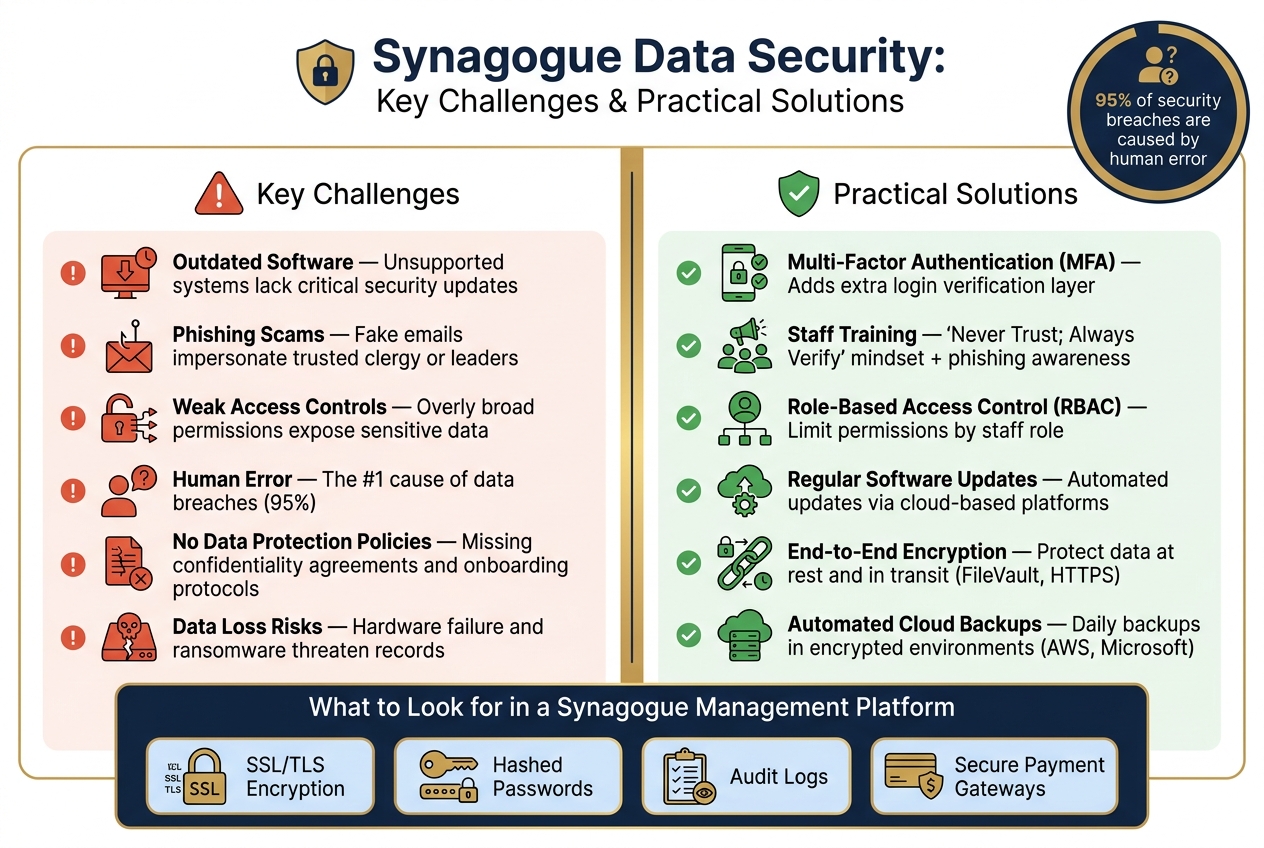
Synagogue Data Security: Key Challenges vs. Practical Solutions
## Common Data Security Challenges for Synagogues
Many synagogues face unique challenges when it comes to data security. Operating with small staffs, limited budgets, and volunteers juggling multiple responsibilities often leaves gaps in their defenses. These vulnerabilities create opportunities for cybercriminals to exploit. Below are some of the most pressing issues that require attention.
### Outdated Technology and Software
One major issue is relying on outdated technology. When software becomes unsupported, vendors stop providing security updates, leaving systems exposed to potential attacks. For example, using an old membership database or an outdated operating system can create serious risks. Similarly, sensitive information stored in mobile apps without proper protections - like passwords or biometric security - can be compromised if a device is lost or stolen.
### Phishing and Fraud Risks
Phishing scams are becoming increasingly sophisticated, often impersonating trusted community leaders to deceive staff or volunteers. These scams can trick individuals into sharing sensitive member data or even authorizing fraudulent financial transactions. This issue is especially concerning in synagogue settings, where the close-knit nature of the community makes such impersonations more believable.
> "Phishing attempts have gotten extremely convincing; your volunteers or staff might receive emails that seem to be from your pastor, asking for sensitive member information." - Hannah Hansen, Concordia Technology Solutions
### Weak or Missing Data Protection Policies
Another common problem is the absence of clear data protection policies. When everyone on staff is granted full administrative access for convenience, it increases the risk of exposing sensitive information like membership records, financial data, and contact details. This lack of defined access controls can lead to unnecessary vulnerabilities.
> "You might be tempted to make every staff member an administrator or give everyone full access to data in your church management software, but this is a security nightmare!" - Hannah Hansen, Concordia Technology Solutions
Additionally, without proper onboarding or confidentiality agreements, volunteers may unintentionally create risks. For instance, forwarding donor records or membership lists without understanding the implications can lead to breaches. As Hannah Hansen points out:
> "People don't know what they don't know, and giving them proper processes and information can save you from big headaches later on." - Hannah Hansen, Concordia Technology Solutions
###### sbb-itb-549ca3a
## Practical Steps to Improve Data Security
Tackling issues like outdated technology, phishing, and policy gaps requires a hands-on approach. Here’s how to strengthen your security measures.
### Setting Up Multi-Factor Authentication (MFA)
Using MFA adds a crucial layer of protection by requiring an extra verification step, making it harder for stolen passwords to be effective. Synagogues can enable MFA through management software that supports Single Sign-On (SSO), such as [Google Workspace](https://workspace.google.com/) or [Microsoft 365](https://www.microsoft.com/en-us/microsoft-365). This directly addresses phishing threats that aim to compromise login credentials.
Adopt a "Never Trust; Always Verify" mindset. For example, verify any unexpected requests by contacting the sender directly, even if the email appears to come from a trusted leader.
> "Phishing attempts have gotten extremely convincing; your volunteers or staff might receive emails that seem to be from your pastor, asking for sensitive member information." - Hannah Hansen, Concordia Technology Solutions
Additionally, enforce automatic account lockouts and require strong, regularly updated passwords. Pair MFA with consistent software updates to further fortify your systems.
### Maintain Up-to-Date Software
Outdated software provides an easy entry point for attackers. By keeping software updated and auditing access permissions regularly, you can significantly reduce vulnerabilities. Ensure that platforms use SSL/TLS encryption for secure data transmission.
Implementing **Role-Based Access Control (RBAC)** is another effective strategy. For instance, a music director doesn’t need access to member contact details, and a communications director shouldn’t have access to financial giving records. Limiting permissions minimizes the potential damage from any compromised account.
### Educate Staff and Members
Even the best systems need informed users to work effectively. As [UUA.org](https://www.uua.org/) emphasizes:
> "After doing all of the above, the first line of defense is…. YOU. Watch out for emails, websites, and popups that try to get you to divulge confidential information."
Training doesn’t have to break the bank. Use a mix of resources, such as vendor-provided video tutorials, free online content from platforms like YouTube, and occasional in-person sessions led by local security experts. Tailor training to specific roles - for example, bookkeepers should learn about financial fraud risks, while clergy should focus on safeguarding confidential pastoral notes on their devices.
Make data security a priority from the start. During onboarding, require new volunteers and staff to sign a **confidentiality covenant**, outlining the rules and expectations before granting them access to systems. This simple step fosters accountability and ensures everyone understands their responsibilities.
## Advanced Measures for Long-Term Data Protection
To ensure data remains secure over time, advanced strategies go beyond the basics. These steps are designed to safeguard sensitive information for years to come.
### Encrypting Sensitive Data
Encryption acts as a critical safety net when passwords or access controls fail. If attackers bypass these defenses, encryption ensures that the data remains unreadable without the proper key. This is especially crucial for **"Protected Information"** like Social Security numbers, financial details, health records, or any data involving minor children.
Both **data at rest** and **data in transit** should be encrypted. For local files, tools like FileVault (Mac) or TrueCrypt (PC) are reliable options. When transferring data online, always look for "https://" in the browser's address bar, which indicates SSL/TLS encryption is active.
**Important Note:** If you lose the password for encrypted data, recovery is impossible. To avoid this, keep a physical copy of encryption passwords stored securely in a locked location.
While encryption protects data from unauthorized access, regular backups ensure you don’t lose it altogether.
### Automated Backups and Secure Cloud Storage
Automated backups are essential for preventing data loss from hardware failures, ransomware attacks, or accidental deletions. For critical financial records, daily backups are ideal. For other types of data, weekly backups are the minimum recommendation.
Storing backups in professional cloud environments, like those offered by [AWS](https://aws.amazon.com/) or Microsoft, adds another layer of protection against physical risks such as theft or fire. However, any backup containing sensitive or protected information must be encrypted before storage or transfer.
In addition to secure backups, using integrated management platforms can simplify operations while bolstering security.
### Using AI-Powered Management Platforms
Specialized synagogue management platforms combine essential security features into a single system, addressing vulnerabilities discussed earlier.
For example, [Easyshul](https://easyshul.com) is an AI-driven platform designed for synagogues. It integrates tools like secure online payments, member portals, donation tracking, and financial management (compatible with [QuickBooks](https://quickbooks.intuit.com/) and [Sage](https://www.sage.com/en-us/accounting-software/)) into one cloud-based system. This eliminates the need to juggle multiple tools, ensuring consistent access controls and built-in reporting.
When evaluating management platforms, ensure they include these key security features:
| Security Feature | Function |
| --- | --- |
| **SSL/TLS Encryption** | Protects passwords and payment information during online transactions |
| **Hashed Passwords** | Ensures user credentials remain unreadable, even if the database is accessed |
| **Audit Logs** | Tracks system changes for accountability and forensic analysis |
| **Secure Payment Gateways** | Processes payments without storing sensitive card details on the platform |
Additionally, platforms that carry **cyber security and Errors and Omissions (E&O) insurance** offer extra protection in the event of a cyberattack. This is an important feature to inquire about before committing to a provider.
## Conclusion: Building a Stronger Data Security Framework
To address the vulnerabilities and solutions we've explored, synagogues must commit to a proactive approach to data security. It's not a one-time task but an ongoing responsibility. For synagogues, this responsibility carries a deeper meaning. As Hannah Hansen of Concordia Technology Solutions explains:
> "When we do our best to protect what belongs to others, including their data in our church management system, we are honoring God by being good stewards."
This perspective underscores an important truth: safeguarding member data isn't just about IT. It's about honoring the trust your community places in you.
### Key Challenges and Practical Responses
Here’s a breakdown of the main challenges discussed and their corresponding solutions:
| **Challenge** | **Solution** |
| --- | --- |
| Outdated software and systems | Automated updates through cloud-based platforms |
| Phishing attacks | Staff training paired with a "Never Trust; Always Verify" approach |
| Weak access controls | Implementing role-based permissions and unique user logins |
| Data loss due to hardware failure or ransomware | Daily automated backups stored in encrypted cloud environments |
| Unprotected sensitive data | End-to-end encryption for data at rest and during transit |
Human error remains a major factor, accounting for **95% of security breaches**. This highlights the dual role of your team: they can either be the weakest link or your strongest defense. With proper training, clear policies, and the right tools, you can significantly reduce risks.
### Technology as a Key Ally in Security
Handling these challenges manually is neither realistic nor sustainable. For most synagogues, especially those with limited staff or volunteers, integrated technology is critical. By consolidating security measures, technology not only simplifies processes but also reinforces trust within your community.
A great example is [Easyshul](https://easyshul.com), a platform designed specifically for synagogues. It combines membership management, financial tools, donation tracking, pastoral care, and communications into one secure, cloud-based system. For congregations with over 150 families, the cost is **$349/month**, and it includes all features and support. Smaller congregations can benefit from their **Small & Mighty** program. Easyshul boasts a **4.9/5 rating** on platforms like [Capterra](https://www.capterra.com/), [GetApp](https://www.getapp.com/), and [Software Advice](https://www.softwareadvice.com/).
Amber Giddings, Executive Director of [Temple Beth Sholom](https://tbsholom.org/), shared her experience:
> "What made me feel confident about choosing Easyshul was knowing it had everything I needed. They truly listen to customer feedback and adapt the platform to users' needs - which is vital."
## FAQs
### What data should a synagogue treat as most sensitive?
Synagogues need to focus on safeguarding **member information**, such as personal profiles, contact details, and relationship data. Protecting this information is essential for maintaining privacy and fostering trust within the community.
### How can we start using MFA without overwhelming volunteers?
Introducing Multi-Factor Authentication (MFA) can feel like a big change, especially for volunteers who may not be accustomed to additional security steps. To make the process smoother, start by enabling MFA for administrative staff first. This gradual rollout gives you time to refine the process before extending it to everyone.
Clear communication is key. Explain the *why* behind MFA - how it protects sensitive information and enhances security. Pair this with step-by-step instructions to guide users through the setup. Some volunteers may need extra help, so be ready to offer support, like resending verification codes or using email as an alternative authentication method.
Adopting a phased, opt-in approach allows volunteers to adjust at their own pace. To further simplify things, create training materials or quick reference guides. These resources can boost confidence and make the transition feel less daunting.
### What should we do first if we suspect a phishing email worked?
If you think you fell for a phishing email, avoid replying or interacting with it further. Instead, take a screenshot of the email header or the phone number it came from, and reach out to your organization to confirm whether it's genuine. Once you've done that, delete the email and block the sender to stop any future attempts.
## Related posts
[](https://blog.easyshul.com/blog/cloud-vs-on-premise-synagogue-software)
## [Cloud-Based vs On-Premise: Synagogue Software Compared](https://blog.easyshul.com/blog/cloud-vs-on-premise-synagogue-software)
[Easyshul](https://blog.easyshul.com/blog/author/easyshul)
Mar 3, 2026 1:18:13 AM
Choosing between cloud-based and on-premise synagogue software boils down to your congregation's...
[Read more](https://blog.easyshul.com/blog/cloud-vs-on-premise-synagogue-software)
[](https://blog.easyshul.com/blog/synagogue-member-engagement-methods)
## [10 Ways to Improve Synagogue Member Engagement in 2026](https://blog.easyshul.com/blog/synagogue-member-engagement-methods)
[Easyshul](https://blog.easyshul.com/blog/author/easyshul)
Feb 24, 2026 1:59:21 AM
Member engagement in synagogues is shifting toward deeper connections and personalized experiences....
[Read more](https://blog.easyshul.com/blog/synagogue-member-engagement-methods)
[](https://blog.easyshul.com/blog/streamlining-operations-with-synagogue-management-software)
## [Streamlining Operations with Synagogue Management Software](https://blog.easyshul.com/blog/streamlining-operations-with-synagogue-management-software)
[Easyshul](https://blog.easyshul.com/blog/author/easyshul)
Nov 30, 2024 4:55:30 PM
Discover how synagogue management software can simplify operations, enhance communication, and...
[Read more](https://blog.easyshul.com/blog/streamlining-operations-with-synagogue-management-software)
[linkedin-in icon](https://www.linkedin.com/company/easyshul) [Follow us on Facebook](https://easyshul.com/)
---
447 Broadway Suite #672, New York, NY 10013, United States
[Shalom@easyshul.com](mailto:Shalom@easyshul.com) (866) 215-5950
Copyright © 2024, Easyshul Inc
```json
{
"@context" : "https://schema.org",
"@type" : "BlogPosting",
"author" : {
"@type" : "Person",
"name" : "Easyshul",
"url" : "https://blog.easyshul.com/blog/author/easyshul"
},
"dateModified" : "2026-07-14T17:35:54.105Z",
"datePublished" : "2026-07-14T17:35:54.000Z",
"headline" : "Synagogue Data Security: Practical Guide",
"image" : [ "https://assets.seobotai.com/cdn-cgi/image/quality=75,w=1536,h=1024/easyshul.com/6a0563dc800645b46e628a04-1778739734386.jpg" ],
"mainEntityOfPage" : {
"@id" : "https://blog.easyshul.com/blog/data-security-solutions-synagogues",
"@type" : "WebPage"
},
"publisher" : {
"@type" : "Organization",
"logo" : {
"@type" : "ImageObject",
"url" : "https://blog.easyshul.com/hubfs/Untitled%20design%20(96).png"
},
"name" : "Easyshul Inc"
}
}
```
```json
{
"@context" : "https://schema.org",
"@type" : "FAQPage",
"mainEntity" : [ {
"@type" : "Question",
"acceptedAnswer" : {
"@type" : "Answer",
"text" : "Synagogues need to focus on safeguarding member information, such as personal profiles, contact details, and relationship data. Protecting this information is essential for maintaining privacy and fostering trust within the community.
"
},
"name" : "What data should a synagogue treat as most sensitive?"
}, {
"@type" : "Question",
"acceptedAnswer" : {
"@type" : "Answer",
"text" : "Introducing Multi-Factor Authentication (MFA) can feel like a big change, especially for volunteers who may not be accustomed to additional security steps. To make the process smoother, start by enabling MFA for administrative staff first. This gradual rollout gives you time to refine the process before extending it to everyone.
Clear communication is key. Explain the why behind MFA - how it protects sensitive information and enhances security. Pair this with step-by-step instructions to guide users through the setup. Some volunteers may need extra help, so be ready to offer support, like resending verification codes or using email as an alternative authentication method.
Adopting a phased, opt-in approach allows volunteers to adjust at their own pace. To further simplify things, create training materials or quick reference guides. These resources can boost confidence and make the transition feel less daunting.
"
},
"name" : "How can we start using MFA without overwhelming volunteers?"
}, {
"@type" : "Question",
"acceptedAnswer" : {
"@type" : "Answer",
"text" : "If you think you fell for a phishing email, avoid replying or interacting with it further. Instead, take a screenshot of the email header or the phone number it came from, and reach out to your organization to confirm whether it's genuine. Once you've done that, delete the email and block the sender to stop any future attempts.
"
},
"name" : "What should we do first if we suspect a phishing email worked?"
} ]
}
```